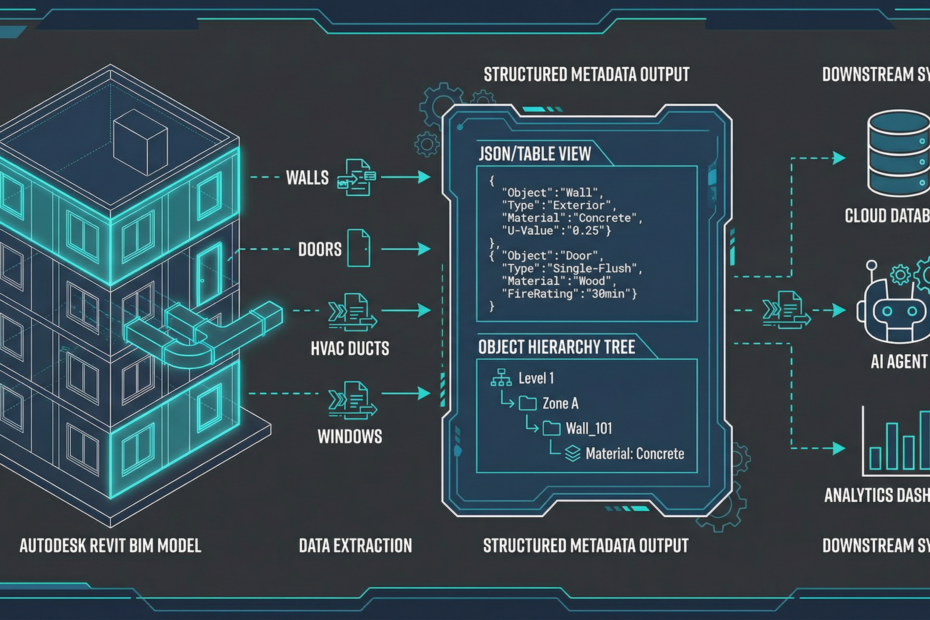
Most of the value in a CAD or BIM model is not in the visual geometry—it’s in the metadata: part numbers, materials, quantities, classifications, and relationships. The Autodesk APS Model Derivative API makes this data programmatically accessible. Here’s how to extract it reliably and feed it into AI pipelines.
What Metadata Is Available?
After translating a model via the Model Derivative API, four types of structured data are available:
- Object tree: the assembly hierarchy—which parts belong to which sub-assemblies
- Object properties: attributes for each object (name, category, material, dimensions, custom attributes set by the engineer)
- Views: which 2D and 3D views are available in the model
- Geometry: bounding boxes, centroids, and face/edge counts (for geometry-aware workflows)
Extraction Walkthrough
import requests

BASE = "https://developer.api.autodesk.com/modelderivative/v2/designdata"
HEADERS = {"Authorization": f"Bearer {access_token}"}

# 1. Get model manifest (lists available derivatives)
manifest = requests.get(f"{BASE}/{urn}/manifest", headers=HEADERS).json()
model_guid = next(d["guid"] for d in manifest["derivatives"][0]["children"]
                  if d.get("role") == "3d")

# 2. Get object tree (assembly hierarchy)
tree_job = requests.get(f"{BASE}/{urn}/metadata/{model_guid}", headers=HEADERS).json()
# Poll until complete if large model
root_node = tree_job["data"]["objects"][0]

# 3. Get all properties for all objects
props_resp = requests.get(
    f"{BASE}/{urn}/metadata/{model_guid}/properties",
    headers=HEADERS,
    params={"forceget": "true"}  # bypass 20-object default limit
).json()

# 4. Build a flat lookup: objectid → properties dict
obj_props = {
    item["objectid"]: item.get("properties", {})
    for item in props_resp["data"]["collection"]
}

# 5. Recursive tree walker to build structured BOM
def walk_tree(node, depth=0):
    oid = node["objectid"]
    props = obj_props.get(oid, {})
    yield {
        "id": oid,
        "name": node.get("name", ""),
        "depth": depth,
        "part_number": props.get("Part Number", props.get("PN", "")),
        "material": props.get("Material", ""),
        "quantity": props.get("Quantity", 1),
    }
    for child in node.get("objects", []):
        yield from walk_tree(child, depth + 1)

bom = list(walk_tree(root_node))
Handling Large Models
For Revit models with thousands of elements, the /properties endpoint returns paginated results. Use the forceget=true parameter to get all properties in one response for smaller models, or implement pagination with the objectid filter for large ones. Production pipelines should cache extracted properties in a database (PostgreSQL or Cosmos DB) to avoid re-extracting on every request.
Feeding Metadata into AI Agents
Once you have structured BOM data, it becomes excellent context for AI agents. A few practical patterns:
RAG over BOMs
Index extracted BOM data in Azure AI Search. Engineers can ask “what’s the total weight of the hydraulic assembly in drawing XYZ-002?” and the agent retrieves the relevant rows and computes the answer.
Change Detection Agent
Extract properties from revision A and revision B. Diff the structured data. Feed the diff to an LLM with a prompt: “Summarize significant engineering changes and flag any that may affect downstream procurement or QA.” Output: a structured change report routed to the right stakeholders.
Quoting Agent
BOM rows → enrich with supplier prices from ERP → LLM fills gaps, handles substitutions, and generates a quote summary with line-item confidence scores → human reviews flagged items → submit to CPQ.
Need APS metadata extraction for your workflow?
Kamna implements production-grade APS pipelines—extraction, normalization, and AI integration. See our APS consulting services.
Book a Discovery Call →