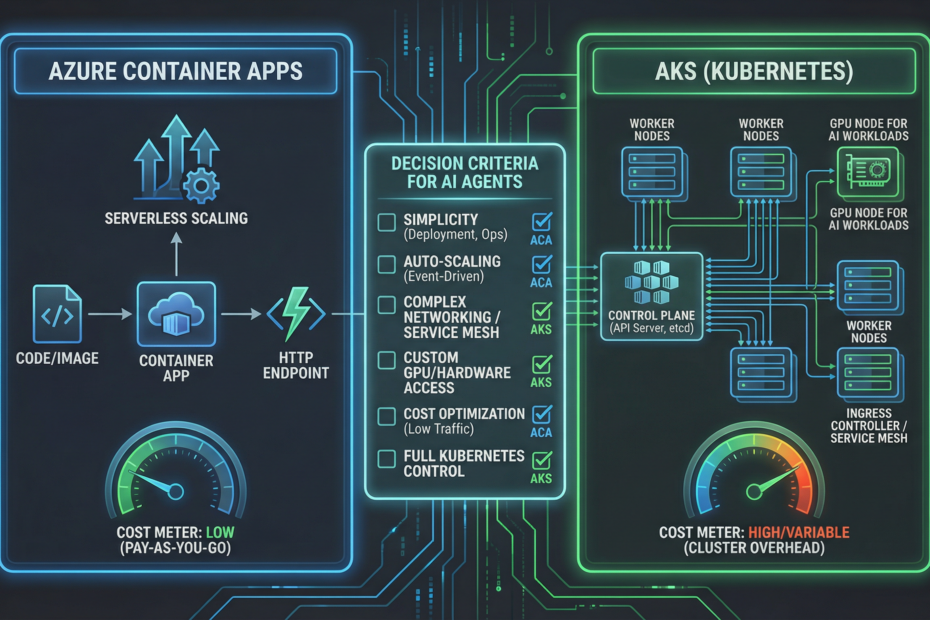
When you’re deploying agentic AI services on Azure, you’ll hit the Container Apps vs AKS decision early. Both containerize your agents. Both scale. But they have meaningfully different operational profiles—and the wrong choice costs you months of ops overhead or limits your scale. Here’s a practical guide for industrial SMEs.
The Short Answer
For most industrial SMEs building agentic AI: start with Azure Container Apps (ACA). Move to AKS only when you hit a specific limitation.
- ACA is serverless—you pay only when agents are processing requests
- ACA has zero cluster overhead—no control plane to manage
- ACA auto-scales from 0 to N replicas based on HTTP/queue/custom triggers
- ACA integrates with Dapr, KEDA, and Azure Service Bus out of the box
When ACA Is the Right Choice
- Your agentic API handles sporadic workloads (e.g., quoting on demand, inspection on upload)
- You want scale-to-zero to minimize cost during off-hours
- Your agents are stateless or use Azure-managed state (Cosmos DB, Redis Cache)
- Your team doesn’t have Kubernetes expertise in-house
- You want fast CI/CD—ACA revision management is simpler than Helm/kubectl
When AKS Is the Right Choice
- You need GPU nodes for on-prem inference (e.g., vision models running at line speed)
- You need fine-grained network policies between agent services
- You have complex multi-service orchestration with sidecar patterns
- You’re running >5 distinct agent services and need shared cluster infrastructure
- You have existing Kubernetes expertise and tooling in your organization
A Practical ACA Deployment for an Industrial Agent
# containerapp.yaml - minimal production-ready ACA agent deployment
resource "azurerm_container_app" "quoting_agent" {
  name                         = "quoting-agent"
  container_app_environment_id = azurerm_container_app_environment.main.id
  resource_group_name          = azurerm_resource_group.main.name
  revision_mode                = "Single"

  template {
    container {
      name   = "agent"
      image  = "myregistry.azurecr.io/quoting-agent:latest"
      cpu    = 0.5
      memory = "1Gi"

      env {
        name        = "AZURE_OPENAI_ENDPOINT"
        secret_name = "azure-openai-endpoint"
      }
      env {
        name        = "AZURE_SEARCH_ENDPOINT"
        secret_name = "azure-search-endpoint"
      }
    }

    min_replicas = 0   # Scale to zero during off-hours
    max_replicas = 10  # Max burst capacity
  }

  ingress {
    external_enabled = false  # Internal only - accessed via APIM
    target_port      = 8000
    traffic_weight {
      latest_revision = true
      percentage      = 100
    }
  }
}
Cost Comparison (Rough Guide for SMEs)
| Scenario | ACA | AKS |
|---|---|---|
| 1 agent, 8-hour workday | ~$15–40/month | $100–200/month (cluster overhead) |
| 5 agents, bursty load | ~$80–180/month | $200–400/month |
| 10+ agents, sustained 24/7 | May exceed AKS | More cost-effective at scale |
Estimates exclude Azure OpenAI token costs, which typically dominate for AI workloads.
Need help with your Azure AI deployment architecture?
Kamna designs containerized agent deployments that are right-sized for your workload and team. See our Microsoft Foundry services.
Book a Discovery Call →